


Magazine Archive
Home -> Magazines -> Issues -> Articles in this issue -> View
Marantz CDR1 CD Recorder | |
Compact Disc RecorderArticle from Music Technology, April 1992 | |
Recording CDs at home reaches the "affordable" level - at under £4000, CD Recordable moves into the realm of the home studio. Tim Goodyer primes the laser.
Genuine technological breakthroughs are few and far between, but the facility to record your own CDs for under four grand qualifies comfortably - hi-tech self sufficiency takes a quantum leap forward with the Marantz CDR1.
"Standards are wonderful", goes the old adage, "that's why we have so many of them". One of standardisation's better moments must be the CD - write in and tell me the last time your CD player wouldn't play a disc (that someone hadn't painted with Hammerite or scarred with a Stanley knife), or played only one audio channel, or chose not to recognise the track numbers... You get the picture; basically a CD is a CD and it'll play happily on any CD player you care to load it into. The reason for this idyllic arrangement is a document agreed between Philips and Sony and respected by (almost) all manufacturers of CDs and players. This splendid document is called the Red Book; discs and players which follow its guidelines are termed Red Book Standard. Yet somehow standards wouldn't be standards if there was only one to worry about, so there's also an Orange Book covering CD recording systems.
Of course, machinery for recording CDs has existed from the beginning of the CD revolution but most of it is the kind of thing used by pressing companies for commercial purposes - producing long runs of CDs for record companies - which makes it costly, complex and cumbersome. If you're looking to knock out a handful of CDs in the same way you might DATs or cassettes this isn't for you.
As with all technology, however, the cost of the hardware involved in making CDs is falling. The cost of systems allowing erasable recordings (CDE) to be made to compact disc is still stratospheric but that of a WORM (Write Once Read Many) CD system is plummeting. Last year Yamaha released their YPDR 601 system which would allow you to cut CDs for around £12,000 - blank discs not included. This year the price is falling again with talk of machines costing nearer four grand than 12. These machines will be coming from companies presently associated more with hi-fi than the recording studio - Mission, Micromega and Meridian - and will all be built around Philips technology. One such machine is already available, however: Marantz' CDR1.
As a result of this price crash, CDR, or Compact Disc Recordable, as the system is termed, will fall into a price bracket consistent with that of serious hi-fi equipment. Consequently, CDR has been under discussion in the hi-fi press for a while - and with one or rather surprising results. For example, according to one of the experts at Meridian, a CDR copy of a commercially available CD can sound better than the source CD. Certainly, if this turns out to be the case (and quite possibly if it does not), CDR will earn itself a place in the prestigious hi-fi rig, but what impact is it likely to have on the business of making music itself?
While most DAT users are unlikely to acknowledge any difference in quality between DAT and CD, none are likely to dispute the fact that CD is a significantly more "universal" medium than DAT will ever become. Material recorded on CD can readily be replayed anywhere from the recording studio to the living room - via the A&R office, naturally. Material on DAT, however, is generally restricted to airplay in professional circles only.
COMPACT LOOKS
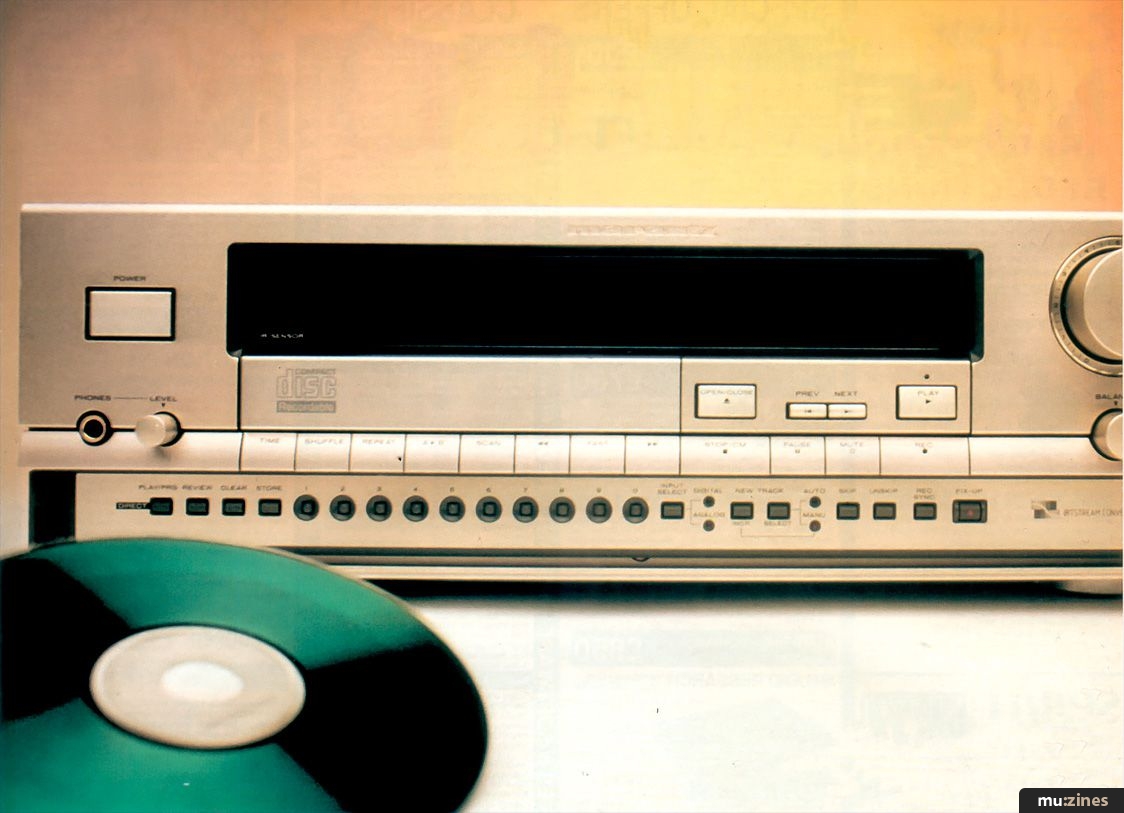
Leaving generalisations regarding CDR aside for a moment, let's take a closer look at the CDR1. Although the machine does come with ears suitable for mounting it in 3Us of studio rack space, it's fair to say that its gold finish and overall styling are more in keeping with current hi-fi than pro-audio gear.
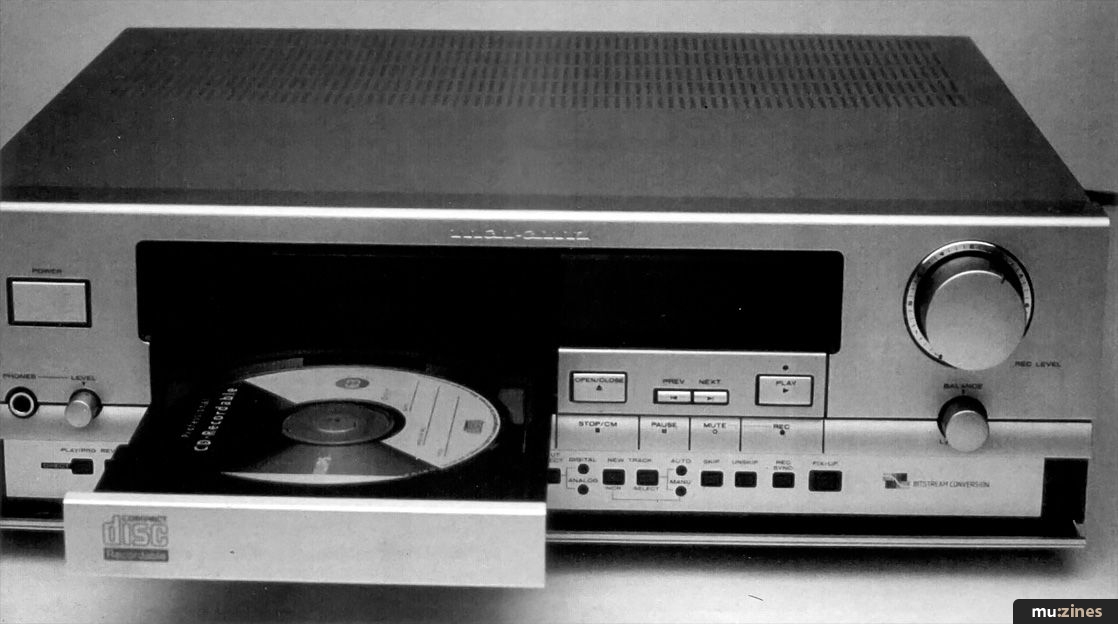
The front panel is dominated by a large display which contains visual indications concerning most aspects of operation. To the left-hand side of the panel there is a power on/off switch, and headphone socket and level control. Beneath the disc drawer are most of the controls associated with any well-facilitated CD machine - Time mode (disc total, total remaining, remaining track), Shuffle, Repeat (track, whole CD, marked section), A-B (repeat markers), Scan, Forward, Fast and Reverse. To the right of the disc drawer are pushbuttons for opening and closing it, Previous/Next track selection, Play, Stop/Clear Memory, Pause, Mute and Record. Next to these are the Rec Level and recording balance controls.
The more specialised functions are concealed behind a drop-down section which runs the full width of the recorder and occupies the lower 1" of the panel. Reading left to right, these are: Play/Prog (switches between direct selection of a track to play and programming a selection of track numbers), Review (of Program), Clear (Program), Store (Program), ten track selection keys 1-0, Input Select, red LEDs for digital or analogue input as selected, New Track Increment (manual track marking on record), Auto/Manual track marking (on record), red LEDs for Auto or Manual track marking as selected, Skip, Unskip, Rec Sync and Fix-up.
"The CDR1 fits so perfectly into the self-sufficient, hi-tech setups many dance musicians are building for themselves, you could be forgiven for thinking it had been designed for them."
On the rear panel of the CDR1 are analogue audio inputs and outputs (phono sockets), digital input and output (co-ax and optical), remote control connections (phono sockets for Philips RC5 interface protocol), Input select switch (Bal/Unbal/Micro), Microphone inputs (left and right, quarter-inch jack sockets), balanced inputs/outputs (XLR) and mains input.
Supplied with the CDR1 (but not provided with the review model) is a cordless remote control.
LASER LOVE
Marantz are renowned for their line in high-quality hi-fi equipment - including compact disc players and the £9000 AX100 Audio Computer. The CDR1, then, can be regarded as a high-quality CD player with the significant addition of a recording facility. For the purposes of this review, functions relating to normal CD playback operation will be overlooked in favour of the machine's performance as a CD recorder.
Obviously, the CDR1 requires blank CDs in order to make recordings. These come pre-formatted and are currently available with 63 minutes of recording time, although 74-minute discs are soon to be available. The present cost of a 63-minute CD is around £23.50 (inc VAT), although the price is expected to fall quickly in line with demand.
An ordinary CD player reads a recording off a disc by firing a laser at the track areas and reading the intensity of the light reflected from "pits" burned into the recording layer. This digital information is then converted to analogue audio information to be amplified and replayed. This conversion either takes place inside the CD to be presented at its analogue outputs, or is retained in its digital format to be presented to an amplifier equipped with digital inputs. In order to record a CD, the CDR1 must, therefore, be capable of burning these pits into a blank disc. This is achieved using a higher-powered laser than is found in playback-only machines - 4-8mW is the quoted recording power.
Although the purpose of the Compact Disc Recordable system is to produce Red Book Standard CD - CDs fully compatible with domestic CD players - the CDs themselves have recording areas on them that are not present on a commercially-produced disc. When a blank recordable disc is loaded into the CDR1 for the first time, the recorder automatically makes a test recording in the first of these areas, the Program Calibration Area. Once made, this test recording is referred to each time the disc is loaded so that the CDR1 knows the correct power setting for recording.
In a commercial CD, details of the contents and running time are encoded in a Table Of Contents (TOC) which is automatically read by a CD player. As the CDR1 allows you to build up the contents of a recordable disc - you don't have to complete the recording in one pass - the information needed to compile this table is not available until the last recording has been made. The second of these areas is called the Program Memory Area and this serves as a temporary TOC for the CDR1. Neither of these special areas of a recordable CD are accessible to a domestic CD player, and so a part-recorded disc cannot be played back on any other machine.
"In operation, the CDR1 couldn't really be much simpler. It behaves as a normal CD player with the addition of a few straightforward, yet crucial, recording functions."
One important aspect of Compact Disc Recordable is that of WORM recording. The practical implication of this system is that you only get one shot at getting a recording right - once something has been recorded, it's permanently encoded on the disc. There is, however, a safety net of sorts; this takes the form of the CDR1's Skip function. Using this facility, you can instruct the CDR1 to exclude complete tracks from the final TOC or include directions to skip over a section within a track. While this won't allow you to claim back areas of the disc you've recorded to, it will allow you to preclude unsatisfactory areas of the recording from appearing when the disc is played back.
BURNING IN
The CDR1, being a professional machine, does not support or recognise any copy protection system. This means that you can copy commercial CDs to CDR if you so wish - although the manual is careful to imply that any CD you might wish to record already contains your own work. The signal may be input digitally, using either optical or IEC 958-11 co-ax protocols, via balanced line or as analogue audio from a line source or microphone. If a digital input from DAT is to be used, it must be from a recording made at the CD standard of 44.1kHz, not the DAT standard of 48kHz. Unless the digital input is acceptable to the CDR1, a No Lock error message is displayed and the machine automatically switches back to analogue input.
OK, you've chosen to commit a recording to CD; this is what you do. Once the appropriate connections have been made, you place a blank (or partly-recorded) disc into the CDR1's drawer. The disc is acknowledged with CD Recordable appearing in the display and the message "OPC" (Optimum Power Calibration) appears while the test recording is made. Pressing Record drops the recorder into Record Standby mode in which the Rec Level control is used to set the signal level. Bearing in mind the horrors of digital distortion, the bar graph meters go up to 0dB (not somewhere between +3dB and +10dB, as is usually the case with analogue recorders). The manual directs you to set an average level of -10dB, above which the display appears in red rather than yellow. If one of the digital inputs is to be used, the record level is set automatically. The balance control allows you to correct any imbalance in the stereo signal.
To put the CDR1 into record, simply press Play. Recording is begun at track number one unless previous recordings have been made, in which case the next track number is automatically allocated. During recording, most of the CDR1's panel controls are disabled to prevent accidental damage to the recording. Only the Mute, Track Increment, Time and Stop/CM functions are operative. Recording is terminated by pressing Stop/CM; alternatively a 30-second (analogue) or six-second (digital) signal absence will cause the machine to exit Record mode. Putting the machine into Record Standby and pressing Mute causes a three-second silent passage to be recorded. Once a recording is complete, pressing Rx-up instructs the CDR1 to compile a final TOC from the contents of its PMA. After this operation no further recording can be made to that particular disc. Fixing-up took around three-and-a-half minutes for the 12-track, 61-minute test disc I recorded. During Fix-up, the CDR1's display gives you an indication of the time remaining until the operation is complete. Once finished, "Recordable" disappears from the CD Recordable display, and the CD effectively becomes an ordinary CD.
If the Skip function is to be used, it must be before fixing-up. Two Skip options are available, though these only apply when the disc is replayed on the CDR1 - when replayed on a domestic CD player, all tracks and passages, including any skips, are played. The first option allows you to exclude a complete track from the running order of the disc, the second to remove sections of a track. To Skip a whole track, the track number is selected with the track selection keys after which the Skip button must be pressed within two seconds. The Record LED flashes, the display reads "Skip" and the selected track disappears from the track number indicator. If Record is pressed, again within two seconds, the track is prevented from playing. The process can be reversed (before fixing-up) by repeating the procedure and substituting the Unskip button for Skip.
To skip a section of a track, the section must first be marked using the A-B repeat function. Pressing Skip brings up the prompts Skip and Verify in the display. The CDR1 now automatically plays the track from five seconds before the A marker to five seconds after the B marker without the marked section. The skip is confirmed by pressing Record. It's worth noting that removing a passage of music from a song in this way doesn't really qualify as a professional edit - it's not an accurate system and you're also left with a short dropout. This would be acceptable for editing speech perhaps, but not music. To unskip a skipped section, the A and B markers must be inserted around the skip and the procedure repeated using the Unskip button. All routines are fail-safe as you need to be quite deliberate in your actions to keep inside the two-second time-outs. Also, the operations can be aborted at any point using Stop/CM. Tracks and sections can be skipped and reinstated a maximum of 20 times.
"The CDR1, being a professional machine, does not support or recognise any copy protection system - this means that you can copy commercial CDs to CDR if you so wish."
The subject of track numbering is one of the less instinctive aspects of the CDR1's operation. Before beginning a recording it is necessary to select either Manual or Automatic track incrementing. In Manual mode, the track number is incremented by pressing the Increment button at any point in the recording. In Automatic mode, the CDR1 can be made to "clone" a commercial CD (or CDV). Using digital inputs and automatic track incrementation, it's a simple job to knock out a clone or two; using the RC5 sync protocol and a number of CDR1s, multiple copying is equally simple.
What's not possible with the CDR1 as it stands is the reading of track index flags from the DAT's bit stream and interpretation of them as CDR1 track increment flags. This means that, in order to give the individual tracks on a DAT master their own track numbers on a CD, you have to insert them manually during recording. Once this is done, however, subsequent copies of that CD will include track numbers.
The reason for this shortcoming is that there is no standard (that word again) concerning DAT track index flags and, consequently, different DAT machine manufacturers have handled them differently. HHB - UK distributors of the CDR1 and no strangers to the world of DAT - will be offering "smart boxes" capable of interpreting this information. I'm certain that they will prove a popular item.
REMOTE ACTION
Although the connection for remote synchronisation is explained in the CDR1's manual as being for use with a dedicated remote control or for syncing to a suitable CD or CDV player, its use in the recording studio extends to linking up multiple machines for duplication purposes. It is possible to mass-produce CD copies in this way, but it's not a cost-effective alternative to using commercial disc mastering facilities. With another of HHB's custom add-ons, however, a small suite of CDR1s is a facility that is likely to appeal to certain areas of the studio market.
VERDICT
In operation, the CDR1 couldn't really be much simpler. It behaves as a normal CD player with the addition of a few straightforward, yet crucial, recording functions. In fact, my first criticism of the machine has to be aimed at the documentation: it's so simple and non-technical that I suspect it's been prepared with the domestic, rather than professional, market in mind. As the answers to the sort of questions the professional users are likely to come up with are also pretty straightforward, I'm sure that HHB will be fielding more technical enquiries than they need if the present documentation isn't supplemented. The CDR1 itself, however, is a pleasure to use.
The burning question is whose pleasure that's likely to be. The key markets are fairly obvious: CD mastering (it's cheaper than U-matic and offers better signal quality); radio station jingles, stings and idents; film sound effects; archiving; mix evaluation; record company promos; even demos could be presented on CDR. In the fast-moving world of dance music, we may well see recordable CDs replacing white label acetates as a source of hot and exclusive tracks. The CDR1 fits so perfectly into the self-sufficient, hi-tech setups many dance musicians are building for themselves, you could be forgiven for thinking it had been designed for them. Expect to see it appearing in the MT gear listings soon.
The viability of CDR as a medium will be hotly debated in certain areas (not the least of which will be the hi-fi world) but I suspect it's a major breakthrough on two grounds: firstly, it makes CDs available to almost anybody - and its popularity would help bring the cost down still further. Secondly, while the limitations of a once-only record system will ensure that it doesn't depose DAT from its present position, the proliferation of CD players is certainly going to make CDR an attractive format for anyone wanting to get their music heard.
Price Marantz CDR1 £3519.13; 63-minute recordable CDs, £19.92 each.
More from Chas Rowden, (Contact Details).
Publisher: Music Technology - Music Maker Publications (UK), Future Publishing.
The current copyright owner/s of this content may differ from the originally published copyright notice.
More details on copyright ownership...

Music Technology - Apr 1992
Gear in this article:
CD Recorder > Marantz > CDR1
Review by Tim Goodyer
Ads for Gear in this article:
Previous article in this issue:
Help Support The Things You Love
mu:zines is the result of thousands of hours of effort, and will require many thousands more going forward to reach our goals of getting all this content online.
If you value this resource, you can support this project - it really helps!
Donations for June 2026
Issues donated this month: 0
New issues that have been donated or scanned for us this month.
Funds donated this month: £0.00
All donations and support are gratefully appreciated - thank you.
Magazines Needed - Can You Help?
Do you have any of these magazine issues?
If so, and you can donate, lend or scan them to help complete our archive, please get in touch via the Contribute page - thanks!
Please Contribute to mu:zines by supplying magazines, scanning or donating funds. Thanks!
Monetary donations go towards site running costs, and the occasional coffee for me if there's anything left over!

 @mu_zines
 RSS Feed
 Blog
Blog